Interconnections between areas in EMPS
MASKENETT.DATA defines transmission network connections between areas and the transfer of energy between those areas.
The documentation applies to LTM version 10.
Note |
|---|
We strongly recommend converting |
MASKENETT.DATA is a text file and no dedicated editor application exists.
File formatting Rules:
Field separator:
,Decimal separator:
.Text values must be enclosed in single quotes (
')Area names are informational.
Area numbers are validated against ENMD files.
Some functionality requires additional licenses.
Table of contents
Example file version 10:
  101,   1,'MASKENETT',  4,   * Version, No. line segments, Description , load periods
 '>GRAF',                              * Start flag graf (group of lines)
 '>LINE',    1,                        * Start flag line, line number
    1,'NUMEDAL             ',   2,'TEV                 ','1_NUMEDAL-TEV' * Id from, area name, Id to, area name, Id line name
   2.00,  2.00,  1.00,                 * Loss (%), transmission charge forward, transmission charge backward
 '>CAPFILE',                           * Transmission capacity from cap_file: key Id line name
 '<LINE',                              * End flag line
 '>LINE',    2,                        * Start flag line, line number
    2,'TEV                 ',   4,'OTRA                ','2_TEV-OTRA' * Id from, area name, Id to, area name, Id line name
   0.10,  0.00,  0.00,                 * Loss (%), transmission charge forward, transmission charge backward
 '>CAPFILE',                           * Transmission capacity from cap_file: key Id line name
 '<LINE',                              * End flag line
 '>LINE',    3,                        * Start flag line, line number
    4,'OTRA                ',   1,'NUMEDAL             ','3_OTRA-NUMEDAL' * Id from, area name, Id to, area name, Id line name
   1.00,  1.00,  2.00,                 * Loss (%), transmission charge forward, transmission charge backward
 '>CAPFILE',                           * Transmission capacity from cap_file: key Id line name
 '<LINE',                              * End flag line
 '>LINE',    4,                        * Start flag line, line number
    4,'OTRA                ',   3,'TERM                ','4_OTRA-TERM' * Id from, area name, Id to, area name, Id line name
   1.00,  1.00,  2.00,                 * Loss (%), transmission charge forward, transmission charge backward
 '>CAPFILE',                           * Transmission capacity from cap_file: key Id line name
 '<LINE',                              * End flag line
 '<GRAF',                              * end flag graf (group of lines)
In version 10 the start/end flags (xml-syntax inspired) was introduced:
'>GRAF'and'<GRAF'encloses the group of lines with formal start- and end-tags.'>LINE'and'<LINE'encloses the line specification with formal start- and end-tags.
1. Header
Format:
IVER,ISEG,'MASKENETT',NPENM
Field |
Type |
Description |
|---|---|---|
IVER |
Integer |
File version number |
ISEG |
Integer |
Number of quadratic-loss segments |
CIDENT |
Text |
Must be ‘MASKENETT’ |
NPENM |
Integer |
Number of price periods |
ISEG:
>1  Quadratic losses enabled
=1  No quadratic losses
Note |
|---|
The file may have weekly time resolution for data even if the file |
Example:
LTM Version 9.4, 1 line segment and 4 intraweek timesteps (LTM-core short-term periods).
94,1,'MASKENETT',4
2. Start tag for group of lines
The tag '>GRAF' is used to open parsing of lines.
3. Line connection of areas definition
'>LINE'and'<LINE'encloses the line specification with formal start- and end-tags.
Example:
 '>LINE',    1,                        * Start flag line, line number
    1,'NUMEDAL             ',   2,'TEV                 ','1_NUMEDAL-TEV' * Id from, area name, Id to, area name, Id line name
   2.00,  2.00,  1.00,                 * Loss (%), transmission charge forward, transmission charge backward
 '>CAPFILE',                           * Transmission capacity from cap_file: key Id line name
 '<LINE',                              * End flag line
For each connection the '>LINE' opens the parsing of a connection following the format:
From_area_number,'From_area_name',To_area_number,'To_area_name','LineId'
Field |
Type |
Description |
|---|---|---|
From_area_number |
Integer |
Source area number |
From_area_name |
Text |
Source area name |
To_area_number |
Integer |
Destination area number |
To_area_name |
Text |
Destination area name |
LineId |
Text |
Optional line identifier (Maximum LineId length: 40 characters) |
Example:
3,'otra',1,'numedal','Svartdalen'
Losses and Transmission Charges
Format:
Loss,Forward_fee,Backward_fee
Field |
Type |
Description |
|---|---|---|
Loss |
Float |
Loss percentage |
Forward_fee |
Float |
Forward transmission fee [EUR/MWh] or [Øre/kWh] |
Backward_fee |
Float |
Backward transmission fee [EUR/MWh] or [Øre/kWh] |
Example:
2.0,2.00,1.00
Transmission Capacity
Two methods are supported.
A. capacity defined in
MASKENETT.DATAB. capacity as time series on
cap_file.h5
A: Capacity Defined in MASKENETT.DATA
Format:
IPENM,KAP_TUR,KAP_RETUR
Field |
Type |
Description |
|---|---|---|
IPENM |
Integer |
Load period number |
KAP_TUR |
Float |
Forward capacity MW |
KAP_RETUR |
Float |
Backward capacity MW |
Weekly Capacity
0,200.0,200.0
Per Load Period Capacity
1,200.0,200.0
2,150.0,150.0
3,120.0,120.0
4,200.0,200.0
All price periods must be specified whenever capacity differs between periods.
B: Capacity as a timeseries on cap_file.h5
The functionality is activated by the following flag.
Flag:
'>Capfile'
4. End tag for group of lines
The tag '<GRAF' is used to close the parsing of the group of lines.
5. cap_file.h5
This file contains transfer capacities used in the market description (MASKENETT.DATA).
File generation options
The LtmApi
Depending on the input time series the LtmApi generates the
MASKENETT.DATAandcap_file.h5as needed.
The application konv_cap_file.exe
Run the application on an existing dataset to convert an existing
MASKENETT.DATAon older format to version 10 format, including generation of thecap_file.h5.
Legacy application Ltm_store
Generates time series on
cap_file.h5.
File description
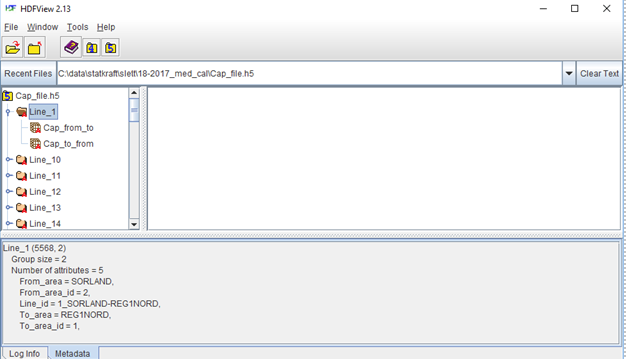
The file is organized as follows, see Figure 1:
One h5 data group (folder) per transmission line
Two h5 datasets per transmission line, for transfer capacities in each direction (
Cap_from_toandCap_to_from)
For the transmission lines the following metadata (h5-attributes) are given:
Line_id : Area is as given in MASKENETT.DATA.
If not specified it is given as <Line_number >_<From_area>-<To_area>, for example
1_SORLAND-REG1NORD
From_area : Name of area
From_area_id : Area number
To_area : Name of area
To_area_id : Area number
|
|---|
6. The LTM core application konv_cap_file.exe
The LTM core binaries contains the application konv_cap_file.exe which converts a MASKENETT.DATA-file to version 10 format, including a conversion of transmission capacities to time series on the file cap_file.h5 (use by EMPS).
It is highly recommended to run the application in order to use a version 10 MASKENETT.DATA file and the cap_file.h5.
The application will create a folder to store the old MASKENETT.DATA in before conversion.
7. Load dependent transmission capacity
Optional licensed functionality.
The section permits line capacity to vary according to a defined load. Multiple validity periods may be specified.
Start Marker
'>LAST'
Total number of Loads
No_of_loads
Load Definitions
One record per load:
iv_load, load_id
Field |
Type |
Description |
|---|---|---|
iv_load |
Integer |
Area number |
load_id |
Integer |
Load/contract id |
Valid Through Week
LastWeek
Forward and backward capacity
Forward/backward capacity |
Type |
Description |
|---|---|---|
No_loads |
Integer |
Number of load steps |
Loads(1:No_loads) |
Float |
Load steps MW |
Capacity(1:No_loads) |
Float |
Transmission capacity values MW |
Backward capacity is equal to forward capacity.
End Marker
'<LAST'
Example
'>LAST'
 2,                                          < Total number of loads
 1,1,                                        < area number, load_id
 1,2,                                        < area number,load_id
 260,                                        < Last week
 11,                                         < Number of load steps - forward capacity
 0.5,  6, 11, 18, 27, 37,50,66,91,118,115    > Load capacity MW
 200,180,160,140,120,100,80,60,40, 20,0.5    > Transmission capacity MW
 11,                                         < Number of load steps - backward capacity
 0.5,  6, 11, 18, 27, 37,50,66,91,118,115    > Load capacity MW
 200,180,160,140,120,100,80,60,40, 20,0.5    > Transmission capacity MW
 '<LAST'
8. Wind dependent transmission capacity
Start Marker
'>Vind'
Total number of Wind Farms
No_wind_farms
Wind Farm Definitions
iv_wind,'filename'
Field |
Type |
Description |
|---|---|---|
iv_wind |
Integer |
Area number |
filename |
Text |
Wind series file |
Valid Through Week
LastWeek
Capacity Curves
Variable |
Description |
|---|---|
vind |
Wind generation MW |
trans_cap |
Available transmission capacity MW |
End Marker
'Vind'
Example
'>Vind'
 2,                                          < Total number of wind farm series
 3,'vindtime_2.V30',                         < Filename wind reference
 3,'vindtime_3.V30',                         < Filename wind reference
 260,                                        < Last week
 11,                                         < Number of wind capacity steps - forward capacity
 0.5,  6, 11, 18, 27, 37,50,66,91,118,115    > Wind capacity MW
 200,180,160,140,120,100,80,60,40, 20,0.5    > Transmission capacity MW - Forward
 11,                                         < Number of wind capacity steps - backward capacity
 0.5,  6, 11, 18, 27, 37,50,66,91,118,115    > Wind capacity MW
 200,180,160,140,120,100,80,60,40, 20,0.5    > Transmission capacity MW - Backward
 '<Vind'
9. Older LTM version functionality
We strongly discourage the use of the Revisions. Use time series on cap_file.h5 for varying transmission capacities.
Use the conversion application konv_cap_file.exe to start using the cap_file.h5.
Revisions / Outages
Revisions modify transfer capacity for specific weeks and optionally specific price periods.
Legacy Sequential Revision Format
The file may contain:
NumberOfRevisions
followed by revision records.
Format:
IPENM,JSTART,JSLUTT,TUR_KAP,RETUR_KAP
Field |
Type |
Description |
|---|---|---|
IPENM |
Integer |
Load period |
JSTART |
Integer |
Start week |
JSLUTT |
Integer |
End week |
TUR_KAP |
Float |
Forward capacity change MW |
RETUR_KAP |
Float |
Backward capacity change MW |
Negative values reduce capacity.
Example:
15,              * # revisjoner
0,1,260,-150,0,  * uke, ukenr start, ukenr slutt, endring tur, endring retur
1,1,260,-100,0,  * prisav., ukenr start, ukenr slutt, endring tur, endring retur
3,4,5,-400,0,
4,4,5,-400,0,
0,20,21,-250,-100,
0,22,23,-700,-100,
1,25,26,-350,-300,
2,25,25,-450,-300,
3,25,25,-450,-300,
4,25,25,-450,-300,
2,26,26,-300,-200,
3,26,26,-350,-250,
1,27,27,-300,-250,
2,27,27,-300,-200,
3,27,27,-300,-250,
Start Marker
'>REV'
Revision Record
IPENM,JSTART,JSLUTT,TUR_KAP,RETUR_KAP[,FLAGG_REP]
Field |
Type |
Description |
|---|---|---|
IPENM |
Integer |
Price period. 0 means entire week |
JSTART |
Integer |
Start week |
JSLUTT |
Integer |
End week |
TUR_KAP |
Float |
Change in forward capacity MW |
RETUR_KAP |
Float |
Change in backward capacity MW |
FLAGG_REP |
Text |
Optional repeat flag |
Repeat Flag
'R'
Indicates recurring outages.
Example:
1,46,62,-400,0,'R'
2,45,62,-250,0,'R'
End Marker
'REV'
Example
94,1,’MASKENETT',3,                       * Version, No of segment, Filename, Load periods
1,'NORGE-NORD',2,'NORGE-RANA','SvartIs'   * Line 1, From (area number ,name), (area number ,name) ,Line id.
0.0,0.3,0.3,                              * Loss (%), Transmission charge (1->2, 2->1) øre/kWh
0,600,600,                                * All load periods. Line capacity (1->2, 2->1) MW
1,                                        * Number of revisions/outages
0,37,42,-200,-200,                        * All load periods, from week 37 to. week 42, -200 MW
2,'NORGE-RANA',3,'NORGE-MIDT','Trondl'    * Line 2, From (area number ,name), (area number ,name) ,Line id.
2.0,0.3,0.3,                              * Loss (%), Transmission charge  (2->3, 3->2) øre/kWh
0,900,900,                                * All load periods, Line capacity (2->3, 3->2) MW
0,                                        * Number of revisions/outages
5,'SVER-NOR',9,'FINLAND','SverFin'        * Line 3, From (area number ,name), (area number ,name) ,Line id.
2.0,0.3,0.3,                              * Loss (%), Transmission charge  (5->9, 9->5) øre/kWh
0,900,800,                                * All load periods, Line capacity (5->9, 9->5) MW
0,                                        * Number of revisions/outages
TRANSCAP_HOUR.DATA Specification
We strongly discourage the use of the TRANSCAP_HOUR.DATA file. Use the conversion application konv_cap_file.exe to start using the cap_file.h5.
Used when capacity is provided as hourly values.
Header
Format:
Version,Years,NumberOfLines
Example:
94,1,3
Line Identifiers
One identifier for every transmission line.
Example:
'Ildfull','Langdryg','Teori'
Identifiers must match LineId values from MASKENETT.DATA.
Hourly Records
Format:
Year,Hour,
Line1_Forward,Line1_Reverse,
Line2_Forward,Line2_Reverse,
...
Example:
2012,1,560.0,540.0,300.0,300.0,500.0,500.0
2012,2,560.0,540.0,300.0,300.0,500.0,500.0
...
2016,8736,560.0,540.0,300.0,300.0,500.0,500.0
For each hour, a forward and reverse capacity must be provided for every transmission line.
Error Handling
If TRANSCAP_HOUR.DATA cannot be parsed, the application reports the year/hour record that caused the error.