API Waterways and hydro topology
This guide explains how to model waterways from an upper reservoir to a lower reservoir (or the sea). A waterway is created implicitly by connecting Reservoir, Power Plant, Bypass, and Spill objects in the input JSON model. The API will validate the input and calculate the waterway, which will then be written to the DETD files.
Water Flow Rules
Water flows must be in the following patterns:
Reservoir → Reservoir
Reservoir → Plant → Reservoir
Reservoir → Bypass → Reservoir
Reservoir → Spill → Reservoir
If any of the “lower” reservoirs are missing, a connection to the sea is assumed.
This is summarized by the following diagram:
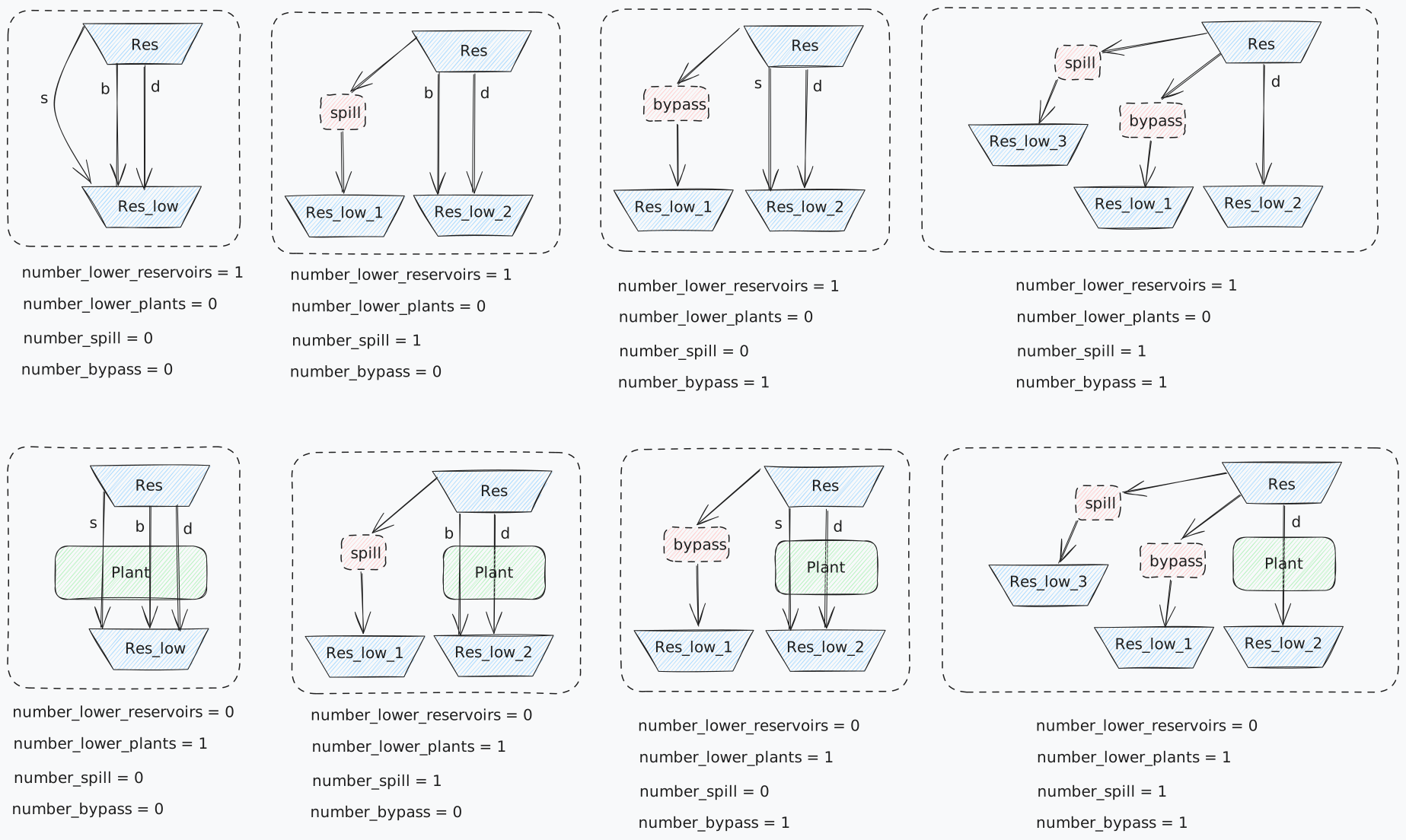
Key Note: Connections are directional and always start from an upper reservoir.
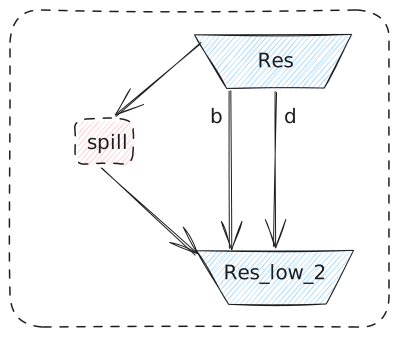
Note also that the Bypass and Spill objects may point back to the same lower reservoir as the discharge waterway. The same topology could have been achieved by removing the Bypass/Spill object completely; however, the option is left to allow for an explicit description and to impose custom restrictions on the Bypass/Spill object.
Examples of Illegal Configurations
Combining objects in an invalid order (e.g., Reservoir → Bypass → Plant).
Connecting multiple objects of the same type (e.g., Reservoir → (2x Bypass) → Plant).
Any upwards connections
Object Types
The API treats the objects slightly differently than the Deta-Module concept of LTM-core.
Reservoir: Represents a storage location for water.
Plant: Represents a facility that processes water and outputs it to a downstream reservoir.
Bypass: Represents a conduit that redirects water around a power plant.
Spill: Represents a safety mechanism to divert overflow water.
Building Waterways
The process of building the waterways consists of two steps. First, all objects must be defined in the JSON input model. Then they must be connected within the connection object.
Creating Objects
The following example shows how the DETD objects are created, avoiding all attributes except name:
{
     "reservoirs": [
         {"name": "UpperReservoir", ...},
         {"name": "LowerReservoir1", ...},
         {"name": "LowerReservoir2", ...}
     ],
     "plants": [
         {"name": "HydroPlant1", ...}
     ],
     "bypasses": [
         {"name": "Bypass1", ...}
     ],
     "spills": [
         {"name": "Spill1", ...}
     ]
 }
Defining Connections
Connections are directional and defined using the connections section of the input model.
"connections": [
    {"from": "UpperReservoir", "to": "HydroPlant1"},
    {"from": "HydroPlant1", "to": "LowerReservoir1"},
    {"from": "UpperReservoir", "to": "Bypass1"},
    {"from": "Bypass1", "to": "LowerReservoir1"},
    {"from": "UpperReservoir", "to": "Spill1"},
    {"from": "Spill1", "to": "LowerReservoir2"}
]
Output
Output will be written for each reservoir to the corresponding DETD file. For each reservoir, three module numbers will be given: the module number for the bypass, spill, and discharge waterway. A value of 0 indicates flow to the sea.